Context for project files
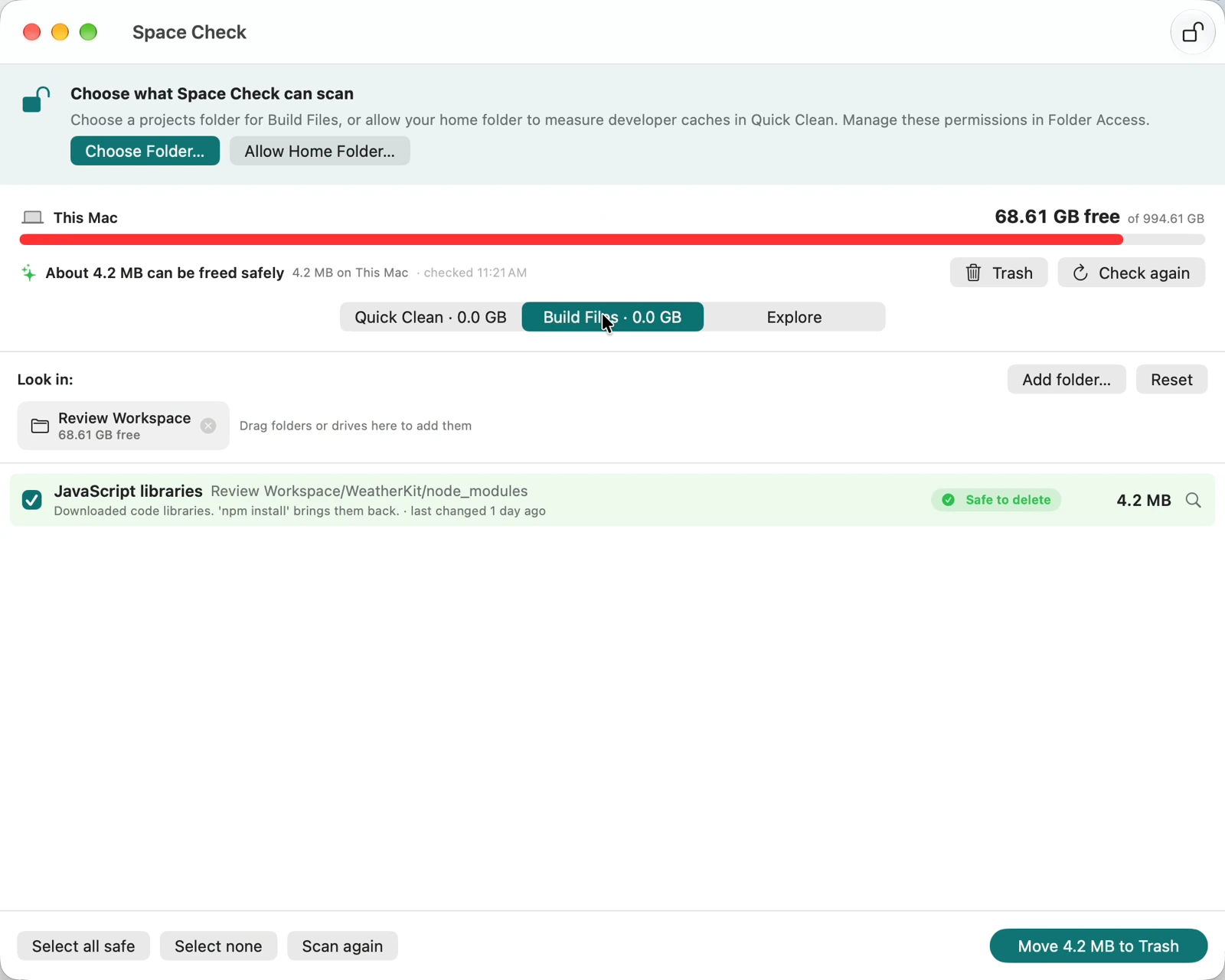
Build Files uses folder names and nearby project markers to recognize common development output.
 Space CheckGet the free Mac app
FOR THE MAC YOU MAKE THINGS ON
Build files. Downloaded dependencies. Media caches. Space Check finds them across your Mac and external drives—and explains what they do, so you can decide what to remove.
Free current release · No account or card required
macOS 13+ · Apple silicon & Intel
BUILT AROUND PROJECT WORK
A size tells you how much room a folder takes. Space Check adds context: what a recognized folder is, why it exists, and what removing it could mean for your next build or edit.
node_modulesDownloaded libraries in a recognized project. Reinstalling can require network access and working package sources.
DerivedDataGenerated build data. Removing it can mean a slower next build while Xcode recreates it.
.pek / .cfaWaveforms and conformed audio in supported cache locations. Rebuilding depends on the original media.
Recognition is a starting point for review, not a guarantee that a folder is disposable. Check its contents and keep a backup.
Build Files uses folder names and nearby project markers to recognize common development output.
Grant access to a projects folder or connected drive. Inspect work wherever you keep it.
See disk capacity from the menu bar. Turn on low-space notifications in Settings.
Choose Space Check when your question is “which build files and caches are taking up room?” It brings project recognition, supported media-cache cleanup and folder exploration together. It is not a backup service, antivirus or performance optimizer.
TAKE A LOOK BEFORE YOU DOWNLOAD
Screenshots show version 1.0 with sample files. The current version 1.1 renames these views Project files, Cache review and Explore folders, removes “Safe to delete” labels, and adds an exact-path review before moving files.
FROM DOWNLOAD TO YOUR FIRST LOOK
You don’t have to clean anything to see what’s taking up room.
Download the ZIP, unzip it, and drag Space Check into Applications. Then open the app.
Grant access to a project folder or connected drive. Review measured sizes and recognized file types.
Select the files you want to review. Check their exact paths, close affected apps and keep a backup. Version 1.1 blocks incomplete or changed inspections and asks you to confirm before moving files to Trash.
Cleanup can cause data loss or interrupt work. Detection and recent-activity checks have limits. Trash is not a backup; recovery and rebuilding are not guaranteed. Moving files to Trash may not immediately free disk space.
SPACE CHECK FOR MAC
Start by finding what’s there.
The current release is free.
Notarization is an Apple security check, not an endorsement or a guarantee against data loss.
Space Check 1.1 (6)
macOS 13 or later · Intel & Apple silicon
No account. No card. No subscription purchase.
On a phone or another device? Open this page on your Mac to install.
Before cleanup, review files and keep a backup. Read how cleanup works.
A FEW THINGS TO KNOW
Yes. The current release is free to download and use, with no account or payment card. We’re exploring optional paid features for the future; there is no subscription to buy on this page.
Space Check focuses on project files: recognizing development output using project markers, explaining supported caches, and exploring folders on your Mac or external drives. Other utilities also offer disk analysis and cache cleanup. Choose this one if its project-focused workflow fits how you work.
Examples include Xcode DerivedData, JavaScript dependencies next to a package.json, CocoaPods beside a Podfile, Swift package build folders, Next.js output and Android build files. Recognition depends on the folder layout and accessible project markers.
Quick Clean recognizes Adobe waveform and conformed-audio files in supported cache folders, plus supported shared image thumbnails. It does not provide universal cleanup of every editing app or every media cache. Keep original media and close affected apps before cleanup.
Yes. Whole folders can contain important files, and classifications or safety checks can miss them. Review paths and contents, keep a tested backup, and do not clean anything you are unsure about. Files moved to Trash may be recoverable, but recovery is not guaranteed.
The current Mac app scans and processes files locally. Folder grants, preferences and the action log stay on your Mac. Website requests and information you choose to send to support are separate. Read the privacy policy.
We don’t promise a speed increase or a fixed amount of space. Results depend on your files. Some removed files must be downloaded or rebuilt, which can make the next build or project open take longer.
Yes, for connected drives and folders you grant access to. Available files and permissions determine what can be scanned. Disk capacity is also available from the menu bar.
Email hello@jtrlabs.com with your macOS version and a description of the issue. You can ask for help without sharing private filenames or your action log.